
You open your AI assistant and type: "add these five contacts to the Customers list, build the spring-sale campaign with a button to the store, schedule it for Thursday at 10, and then tell me how last week's campaign performed." The assistant does it — on your real arrobaMail account, with your lists and your data, asking for confirmation before anything gets sent. That's not a futuristic demo: it's what arrobaMail's native MCP server enables, available on every account —Free Plan included— with a connection that takes two minutes and zero lines of code.
In this article we cover what it is exactly, what you can do today, and why we think it's the channel's biggest productivity leap in years.
MCP in two sentences
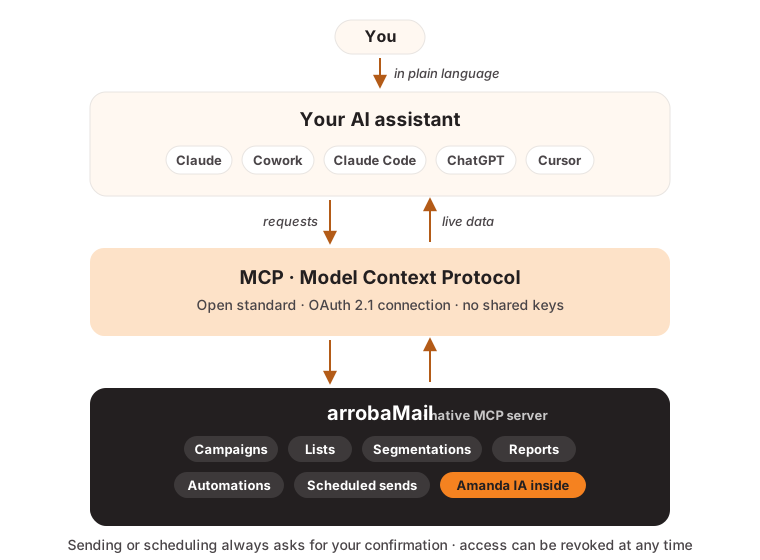
Model Context Protocol (MCP) is the open standard that connects AI assistants to applications: it defines how an assistant discovers what a platform can do and how it executes real operations on it. Anthropic (the company behind Claude) created it in late 2024, and today it's governed neutrally under the Linux Foundation with backing from OpenAI, Google, and Microsoft — which is why it works the same from Claude, ChatGPT, Cursor, or any compatible client.
The ecosystem exploded: there are already more than 10,000 public MCP servers, and 2026 industry surveys show that about half of organizations are experimenting with MCP, but only 11% have reached production. Translation: whoever adopts it now runs ahead. arrobaMail was among the first email marketing platforms in Latin America with a native MCP server — the same class of integration the channel's global giants rolled out this year.
What changes day to day
Without MCP, running your email marketing means: open the platform, navigate, click, export, summarize. With MCP, it's a conversation. arrobaMail's server exposes the platform's full cycle —campaigns, lists, segmentations, automations, reports— as capabilities your assistant uses in real time. A tour of what that means:
Manage subscribers without opening a CSV
"Add the contacts they sent me over WhatsApp to the Customers list" — and it loads them, fields included. "How many active subscribers do I have? How many joined this month?" — and it answers with your account's real numbers. List additions, removals, and lookups stop being spreadsheet chores: they're one sentence.
Segment by talking
Segmentation is one of email marketing's most powerful and least used features — because configuring it is intimidating. Via MCP, your assistant creates segmentations, duplicates them, shows you how many contacts match before you use them, and adjusts until the slice is exactly what you're after: "build me a segment of people who opened any of the last three campaigns but didn't click, and tell me how many they are."
Create the full campaign, as a draft
You describe the goal —"campaign for Friday's launch, friendly tone, one single call to action to the landing page"— and the assistant writes the content, builds the responsive HTML, and saves it as a draft in your account. That design is deliberate: creating a draft sends nothing. You open arrobaMail, review it in the editor, and the final button is always yours.
And inside the platform, the other half of the duo is waiting: Amanda IA, which generates content and images with the 40 monthly generations included in every plan, analyzes your sends, and knows your Brand Kit. Your assistant on the outside, Amanda on the inside: two AI layers that complement each other rather than compete.
Schedule and send — always with your confirmation
"Schedule the send for Thursday at 10, Miami time." The assistant can validate the campaign, send a test to your inbox, schedule it, or even stop a send in progress — and sensitive operations always ask for your confirmation, on top of requiring a verified sender. The AI accelerates; the decision stays yours.
Analyze results and plan the next move
This is where conversation shines: "compare July's campaign against June's: opens, clicks, bounces — what would you improve?" The assistant queries the real statistics, crosses them, and returns the analysis with recommendations. Ask for the overall dashboard, a campaign's detail, or a weekly summary ready to forward to your team.
Automations assembled by talking
Welcome sequences, win-backs, event-driven flows: via MCP your assistant can draft an automation, review it, activate it, pause it, and tell you who's enrolled and how it's performing. What used to be an afternoon of configuration becomes a well-phrased request.
The advantages, in plain terms
- Zero context switching. Your email marketing lives where you already work: your assistant's chat, next to the rest of your tasks. Klaviyo, Brevo, and the world's big players are heading the same way — it's where the entire channel is moving.
- Natural language as the interface. There's no menu learning curve: if you can describe what you want, you can operate it.
- Real-time data, not exports. The assistant queries your account live; it never works off a stale snapshot.
- A 2-minute connection, secure by design. The connection uses OAuth 2.1, the scheme the MCP specification requires: paste a URL, sign in, authorize permissions — no shared keys, and access you can revoke from your account at any time. In a year when poorly secured AI integrations made headlines, that detail is not minor.
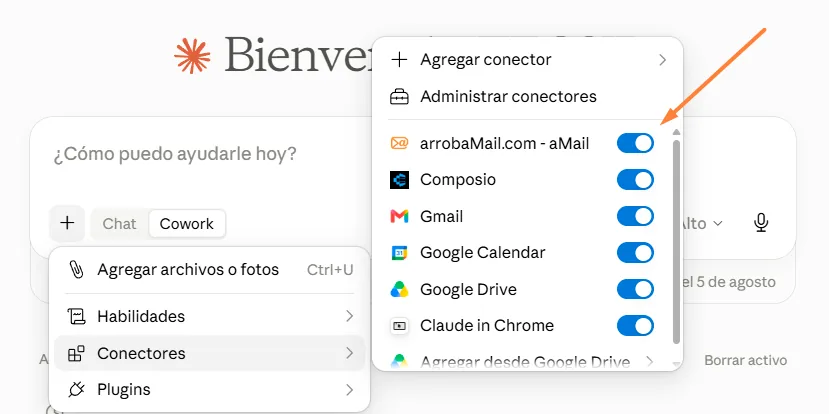
- One connector, every surface. Add it once in Claude and it works in chat, Desktop, Cowork, and Claude Code. Prefer ChatGPT or Cursor? The same URL works.
How to start today
- If you don't have an account yet, the Free Plan is enough to try all of this — Amanda IA and MCP access included, no credit card.
- Follow the step-by-step tutorial with screenshots: dashboard → Tools → MCP (IA) → copy the URL → paste it into your assistant → authorize. Two minutes.
- Start with queries (campaigns, lists, reports) and, once you've got the hang of it, move on to drafts and automations. The server's technical detail and tool catalog is on the MCP page.
Email marketing has been digital marketing's best-returning channel for decades. What changed in 2026 is who does the repetitive work: now your assistant does it, with your data, under your rules — and you go back to what no AI does for you: knowing your audience and deciding what to tell them.